Showing posts with label Linux. Show all posts

Wednesday, October 14, 2020

Address Resolution Protocol(ARP)

 ARP work between data link layer(layer 2) and network layer(layer 3) of Open System Interconnection model(OSI). It's use for translate IP address(32-bit) to MAC address(48-bit).


TLS/SSL Basic Concert

 1) Administrator generate a pair of private key and public key for secure SSH to server authorize

2) Server generate a pair of private key and public key, and sent a signing request with CSR and public key to Certificate Authority(CA) 

3) Certificate Authority(CA) generate a pair of private key and public key(known by all user browser authority), using private key signed certificate(CSR signing request from server) and sent back to server

4) Server using the CA signed certificate and public key to reply the Users https request

5) Users using the known CA public key to validate the CA signed certificate and get server public key

6) Users generate the symmetric key and encrypted by the server public key and sent back to the server

7) Server using the private key to decrypted and retrieve the symmetric key 

8) the symmetric key is used for communicate going forward the security between users and servers

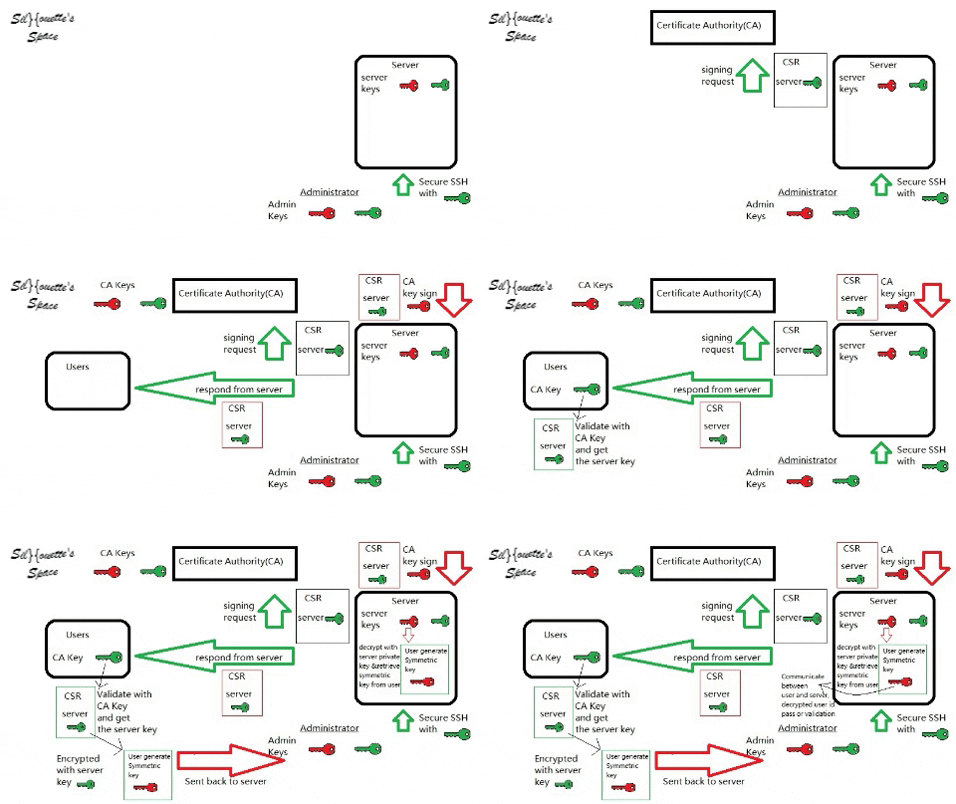
9) Summaries


Tuesday, January 29, 2019

語音格式 Audio Format 批量轉換

    某一天當語音處理的大量檔案格式不符合要求時,如果逐個使用軟體轉換,將會相當費時費力。這裡將再次使用到CLI指令方式,完成批量處理語音檔案。

Solution:
    解決方法將會使用到以下的指令、option,和一個for迴圈,
sox 指令: 專門處理語音轉換,支援大部分的格式,有許多轉換的options,
常用的options 有:
-v 調整語音音量大小
-t 文件格式
-b 語音bits
-c channels數,mono or stereo
-r 語音sample rate
-e encoding 編碼

完整執行指令如下:

Silhouette@Home:~$ for f in YOURAUDIOPATH/*.nist; do
sox -t raw -e signed-integer -b 16 -c 1 -r 8000 "$f" -t wav -e signed-integer -b 16 -c 1 -r 8000 "${f%.nist}.wav" trim 0.023 ;
done

trim 為nist 的header 可去除,主要處理語音為紅色highlight,
完成!!!

Monday, January 28, 2019

Ubuntu Python pip與pip3 錯誤(ImportError: No module named _internal)

    某一天,安裝系統python 新插件時,發現pip 與 pip3 的package 混亂導致python3的pip package 和 python2.7的package互相混合,裏頭的插件都無法使用。


Solution:
    解決方法必須先把python 和python3 的pip 給uninstall 移除,

Silhouette@Home:~$ sudo apt-get purge python3-pip python-pip python-pip-whl

然後再用curl 下載get-pip.py,

Silhouette@Home:~$ curl https://bootstrap.pypa.io/get-pip.py -o get-pip.py

最後重新安裝pip,

Silhouette@Home:~$ sudo python get-pip.py --force-reinstall

如果需要python3的pip (把他當成pip3),再由apt 安裝,

Silhouette@Home:~$ sudo apt-get install python3-pip

可由pip -V 和 pip3 -V 檢查是否有問題,
 pip -V

pip3 -V

完成!!!

Thursday, January 24, 2019

如何使用unix CLI統計folder底下語音的總時長

    某一天當發現需要統計folder 和subfolder底下二三十萬條語音數據時,確實不是能夠靠人工逐個計算那麽簡單的事。


Solution:
    需要使用到以下5個pipeline 形式的指令

ls = 顧名思義就是 "list" 當下folder內的所有資料
grep = 抓取自定義的文件名稱或副檔名
soxi = Sox 的親兄弟,能夠顯示語音檔案的所有資訊,如:-t filetype, -r sample-rate, -c channel,             -D duration, -b bits per sample等
awk = 非常強大的一個文件處理指令,能夠處理計算、比較、批量處理、文件合併等等,
           可參考:https://awk.readthedocs.io/en/latest/index.html
parallel = 平行處理對應指令,可以由 -j $(nproc) 最大化機器平行處理jobs的數目

利用這些指令在terminal 內輸入以下的pipeline形式,

YOURDATAFOLDER~$ ls | grep ".wav" | parallel -j $(nproc) soxi -D {} | awk '{SUM += $1} END {printf "%d:%d:%d\n", SUM/3600, SUM%3600/60, SUM%60}'


會得到以下結果,完成!!!